
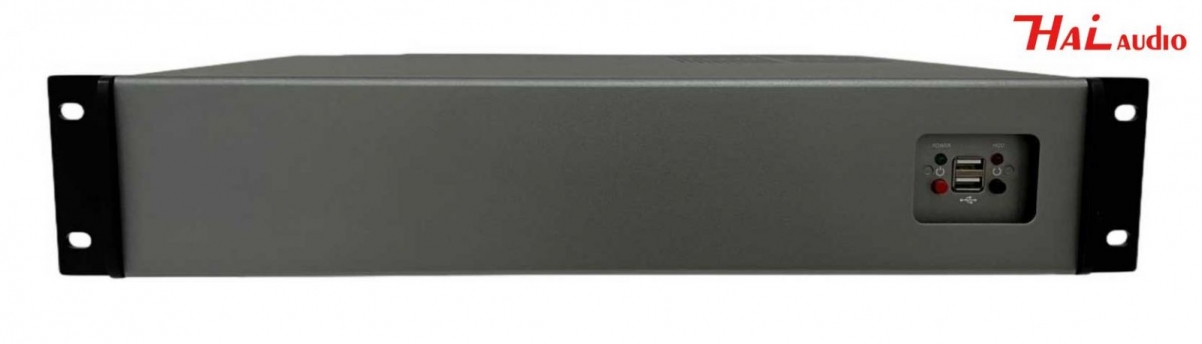

Central Controller for Lifting Monitor and Paperless Conference System HAI-S6000
Product Features
-
Supports multiple conference rooms and various terminal devices; allows simultaneous power control (on/off) of one or more terminal devices.
-
Supports unified control of lifting mechanisms and allows managing multiple conference rooms via a single web interface (start, refresh, end meetings, and view meeting details on one interface).
-
Supports simulated seating arrangement ranking in the conference room with both automatic and manual sorting based on personnel weight. Seat positions can be adjusted by drag-and-drop and saved/synchronized to terminals in real time.
-
User management functions include adding, importing, editing, and deleting users; supports user grouping and organizational structure setup. Organizational structure can be used to filter users during addition. Batch user import is supported, with auto-generation of the organization structure. Lift configuration files can be imported and exported.
-
Supports multiple permission management modes: system administrator, secretary, regular user, service staff, and audience. Meetings created by different secretaries are securely isolated, and the system administrator has full control over all meetings.
-
Supports creation of multiple meeting templates. The meeting organizer can edit templates including participants, slogans, custom nameplates, seating arrangements, menu management, and quick meeting creation.
-
Multiple meeting slogans are supported. Slogans can be changed during the meeting to reflect different agendas or topics. Supports one-click export of agendas, meeting topics, and meeting documents.
-
When voting is enabled, participants can vote and see real-time results. Supports in-meeting vote list, historical vote records, single/multiple choice, anonymous voting (with optional real name export), countdown timer, time-limited voting, auto-shuffle, auto-screen-casting, etc. One-click export of vote details and reset voting supported.
-
Supports simplified versions and pie chart result display mode; background voting result viewing is supported with a list of non-voting participants.
-
Upload and import of documents supported. File view permissions are enforced — restricted users will have content auto-blocked on their terminals.
-
Allows adding/editing of meeting topics and switching between different ones. Supports agenda and document arrangement. Batch upload of agendas, topics, and documents by folder is supported. Menus can be shown/hidden in real time, and main/submenus can be sorted.
-
During a meeting, terminals can display welcome screens, meeting info, name tags, slogans, and other pages. Also supports centralized lift control, centralized and individual power on/off, lift/mic lift control, and file server shutdown. Supports external signal display, and forced/free display modes for broadcasting content or video from external sources to terminals.
-
On-demand video playback from the server and live video streaming in real time are supported with full-screen display.
-
Embedded browser supports Ethernet browsing and access to OA systems, email, etc.
-
Supports running Windows 7 or Windows 10. The system is stable and reliable, offering management, control, data interaction, services, and other functions for paperless multimedia conferencing.
-
Uses B/S management platform architecture and C/S client structure. Web-based remote login supported.
-
Simulated pre-meeting seating arrangements and ranking exports are supported, useful for system notifications or private exchanges with one or multiple participants.
-
Real-time reception and handling of conference service requests. Supports mobile APP for conference logistics and real-time communication of on-site needs via mobile devices, improving efficiency.
-
Conference documents from paperless terminals can be opened on mobile terminals. A magnifier tool is available for zooming in on unclear content (e.g., Chinese characters in PPTs).
-
Supports embedded or external opening modes for Office and PDF documents, including second-level PDF opening modes.
-
Wireless control of chairman terminal display via mobile devices (phones or tablets) supported. Enables touch operation of paperless terminals and cross-platform interactivity between Android and Windows within the same room.
-
Usage statistics for multiple rooms are supported, including:
-
Number of meetings per month/year (bar chart)
-
Meeting duration (bar chart)
-
Room usage time (bar chart)
-
Peak meeting time periods (line chart)
-
Total number of meetings and cumulative meeting time per user (bar chart)
-
-
Only senior administrators can delete historical meeting files. The system supports automatic generation and one-click export of meeting summaries.
-
SMS notification functionality supported via Tencent Cloud SMS templates. Recipients can RSVP by clicking a link on their mobile phones.
-
One-click bulk client upgrades supported.
-
Android app downloads and logins via QR code scanning are supported. QR codes for login can be exported.
-
Supports batch conversion of Word, PPT, XLSX files to PDF.
-
Multiple logins supported before, during, and after the meeting.
-
Allows uploading of custom logos; different logos can be used in different rooms.
-
Supports switching among three UI themes; terminals can have different interface styles.
-
iPhone-style slide menu supported.
-
Mobile phone QR code login supported.
Technical Specifications
-
Installation: Standard 19" rack-mountable server chassis, 2U height
-
Hardware Configuration:
-
Motherboard: Intel® H410 Express chipset
-
CPU: Intel Core i5-10400, 2.9GHz, 6 cores / 12 threads
-
Memory: Kingston 8GB
-
Storage: Kingston 480GB SSD
-
Cooling Fan: Cool Cool-H116
-
Interfaces:
-
1×RJ45 Ethernet
-
6×USB
-
2×COM
-
1×Audio
-
1×VGA
-
1×HDMI
-
1×DVI
-
-
-
Power Supply: 200–240V ~ 5A, 50/60Hz
-
Net Weight: 6.2 kg
-
Dimensions (W×D×H): 484 × 350 × 88 mm


_thumbcr_420x320.JPG)
_thumbcr_420x320.JPG)